One case, the whole story: what makes ServAIceDesk different
When email stops working on a Monday morning, the problem does not arrive as one neat ticket. It arrives as twelve emails from users, three alerts from the monitoring tool, a security warning nobody has looked at yet, and a change someone made on Friday evening. In most service desks those pieces live in different places, and the first hour goes into finding them. ServAIceDesk was built around the opposite idea: one case carries the whole story.
The problem with scattered context
Classic ITSM tools were designed around forms and queues. A request is a ticket, an incident is a ticket, a change is a different kind of ticket, and monitoring is a separate product with its own console. The agent becomes the integration layer: copying a hostname from an alert into a search box, checking the change calendar in another tab, asking a colleague whether that server was patched.
That work is invisible in reports, but it is where small IT teams lose most of their time. It also makes mistakes likely, because the person handling the case rarely sees everything at once.
What “one case” means in practice
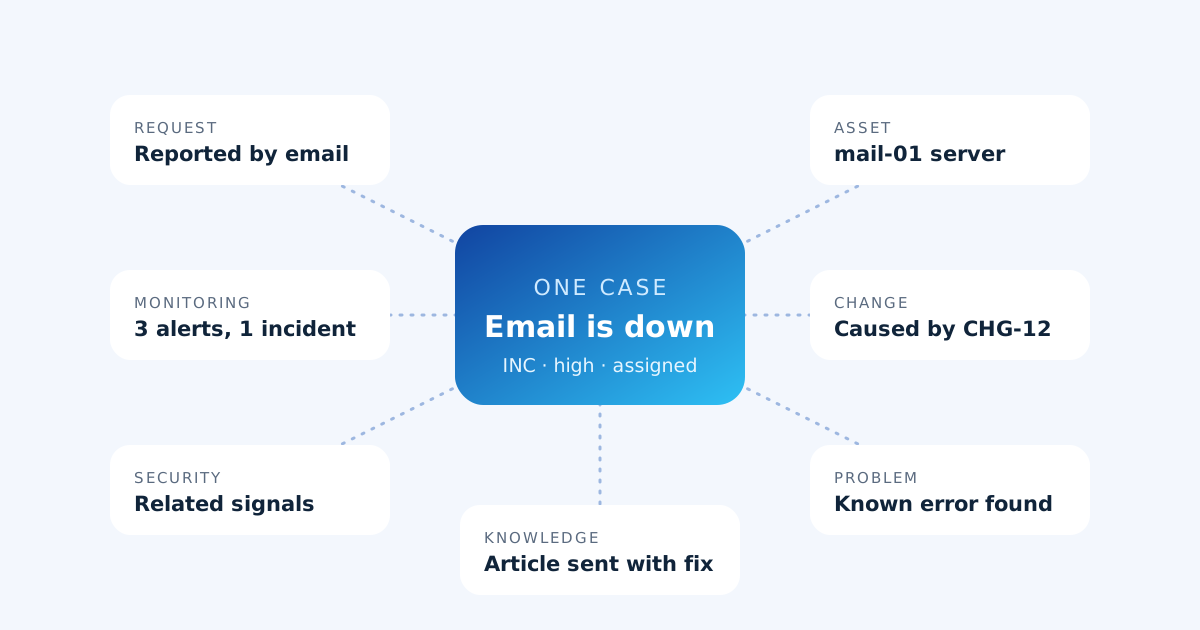
In ServAIceDesk the case is the centre, and everything relevant attaches to it:
- The request itself, from email, the self-service portal or the help widget on your website, with attachments and every reply in one conversation.
- Monitoring alerts that are correlated into the incident they belong to, so repeats of the same condition add to one row instead of opening new tickets.
- Security signals, grouped into situations, that relate to the same user or machine.
- The affected asset from the asset register, with its warranty and the other open cases on it.
- Linked changes and problems: the change that caused it, the change that fixed it, and the known error behind it with its workaround.
- The knowledge article that answers it, sent to the requester with the reply.
AI that shows its working
Many products now add an AI summary on top of a ticket. ServAIceDesk uses AI where it removes real work: classifying and routing new requests, suggesting the next step, drafting a reply. What makes it different is that the AI shows the evidence it used, and evidence and interpretation are kept apart on the case. An agent can see which alert, which article or which previous case led to a suggestion, and decide for themselves.
When the AI service is busy or unavailable, intake does not stop: a deterministic rules fallback classifies and routes the request so nothing waits in an unsorted pile.
People stay in control
Automation in ServAIceDesk is policy-gated. Your autonomy policy decides which actions may run on their own and which wait for a person to approve them, and every run leaves a note on the case describing exactly what it did. The full audit trail records who changed what, and when. Nothing happens to a case that cannot be explained afterwards.
Built for lean IT teams that run their own infrastructure
ServAIceDesk is aimed at IT teams of a few people who look after their own servers, networks and security tooling. For those teams, the service desk is not a separate department: the same people answer the requests, watch the alerts and make the changes. A single workspace that connects those jobs is not a nice extra; it is the difference between keeping up and falling behind.
Each organization’s data is isolated from every other organization’s at the database level, sign-in is passwordless, and you can export or delete your data at any time.
Where to go next
In the following articles we look at how ServAIceDesk takes repetitive work off a small team, how the ITSM practices connect to each other, and how noisy alerts become a single incident. Or take the product tour to see the case workspace.