Doing more with a lean IT team: how ServAIceDesk uses AI to take work off people
Small IT teams rarely lack skill. They lack hours. A surprising share of the day goes into work that needs no expertise at all: reading a request to decide who should handle it, answering the same password question for the fifth time, reminding an approver, copying a status into an email. ServAIceDesk is designed to take that routine work off people, so the same team can look after more users and more systems without burning out.
Where the hours actually go
Before automating anything, it helps to be honest about where time is spent on a typical service desk:
- Triage: reading every new request, deciding what it is, how urgent it is and who should own it.
- Repeat answers: the same how-to questions, answered by hand with a link to the same article.
- Chasing: approvals that are waiting, tasks that are half done, requesters who have not replied.
- Context gathering: checking monitoring, the asset, recent changes and similar past cases before doing anything useful.
None of these need a senior engineer. All of them can be done, or at least prepared, by the system.
Step 1 — Intake that sorts itself
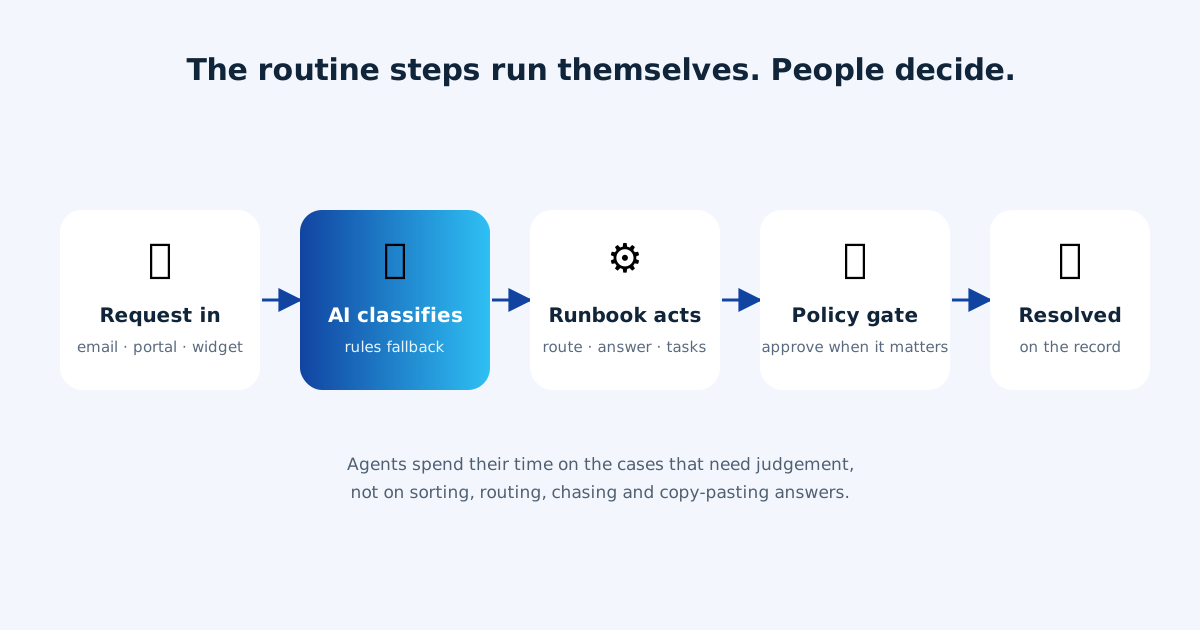
Every request that arrives by email, through the portal or from the website widget is classified by AI: incident or request, which service, which priority. Routing rules and automatic assignment then hand it to the right group or person, skipping anyone who is marked as away and giving their work to their backup. If the AI is busy or unavailable, a deterministic rules fallback does the same job, so the queue never fills up with unsorted work.
Auto-replies, bounces and newsletters are filtered out before they become cases, so agents only see real requests.
Step 2 — Built-in runbooks do the routine steps
ServAIceDesk ships with built-in automations that run inside the product, without extra tools to set up:
- Triage applies routing rules, links a known error if the problem is already understood, and points to similar resolved cases.
- Fulfil handles catalog requests: sets the owner, creates the fulfilment tasks from a template, sends the answer and the help article, and can resolve the request once the answer is sent, while the requester can reopen it by replying.
- Review change checks a planned change for missing plans, window conflicts and overlaps on the same service or asset before it goes to approval.
- Investigate gathers the linked incidents, services, assets and alerts for a problem so the investigation starts with the facts on one page.
Every run writes a note on the case listing exactly what it did. When a connected tool is needed, such as an identity provider for an account unlock, the same run can call it.
Step 3 — People approve what matters
Removing work from people is not the same as removing people from decisions. Your autonomy policy sets, per kind of action, whether it may run on its own or must wait for an approval. Low-risk, reversible steps can run immediately; anything with real impact waits for a person. Approvals can be requested by email, so an approver does not need to sign in to say yes.
Step 4 — The AI case assistant prepares, the agent decides
On the cases that do need a person, the AI case assistant shortens the time to an answer: it summarises the conversation, proposes a next step and drafts a reply, with the evidence it used shown next to its suggestion. The agent edits, sends, or ignores it. Requester sentiment is flagged, so a frustrated user does not wait behind a routine one.
What this changes for a small team
The result is not fewer people for the sake of it. It is a team whose time goes to the work that needs judgement: diagnosing the real outage, planning the change, improving the service. Service levels are tracked automatically, with overdue work surfaced on the home screen, so nothing is forgotten when the team is busy.
Want the bigger picture? Read what makes ServAIceDesk different, or see how it works.